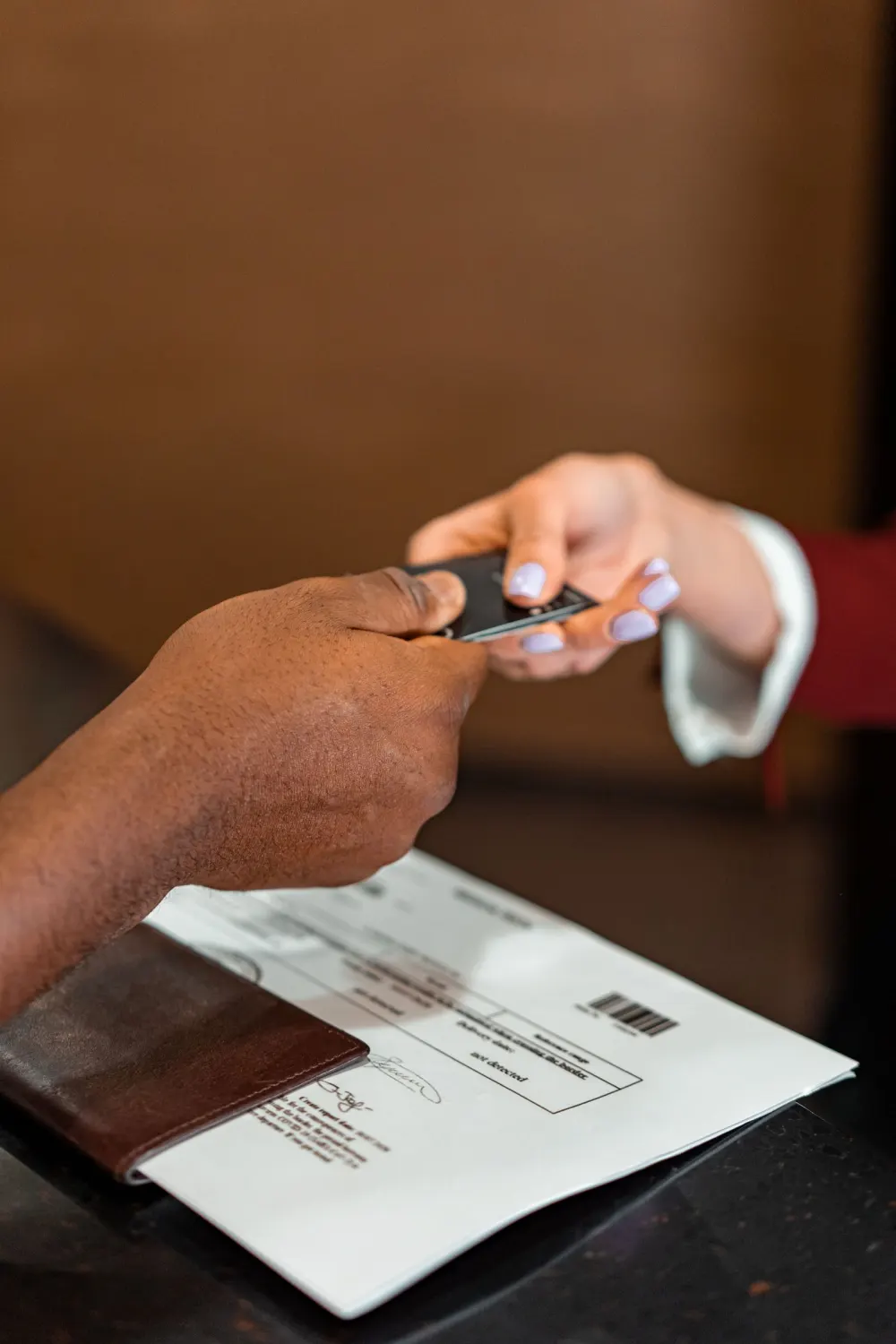
Scan business cards into your CRM.
Krane is a business card scanner app for iPhone and iPad. It reads cards and event badges with no signal, files them under your event, and sends them to HubSpot, Salesforce or Pipedrive.
Free for 10 scans a week. No account to create.
Krane in numbers
10 free scans a week
Counted over a rolling seven days, with events, badges, offline reading and Apple Contacts included. Krane Pro removes the limit.
3
 HubSpot
 Salesforce
 Pipedrive
CRMs synced natively, plus a signed webhook for Zapier, Make and n8n.
8 app languages
- Scan
- Scannen
- スキャン
- Scanner
- 스캔
- Escanear
- Scansiona
- Escanear
0 accounts to create
Cards and CRM tokens stay on your iPhone.
Also out to
- Excel
- Apple Contacts
- vCard
From card to CRM
Each card takes four steps from the table to your CRM. Badges take the same path.
The scan
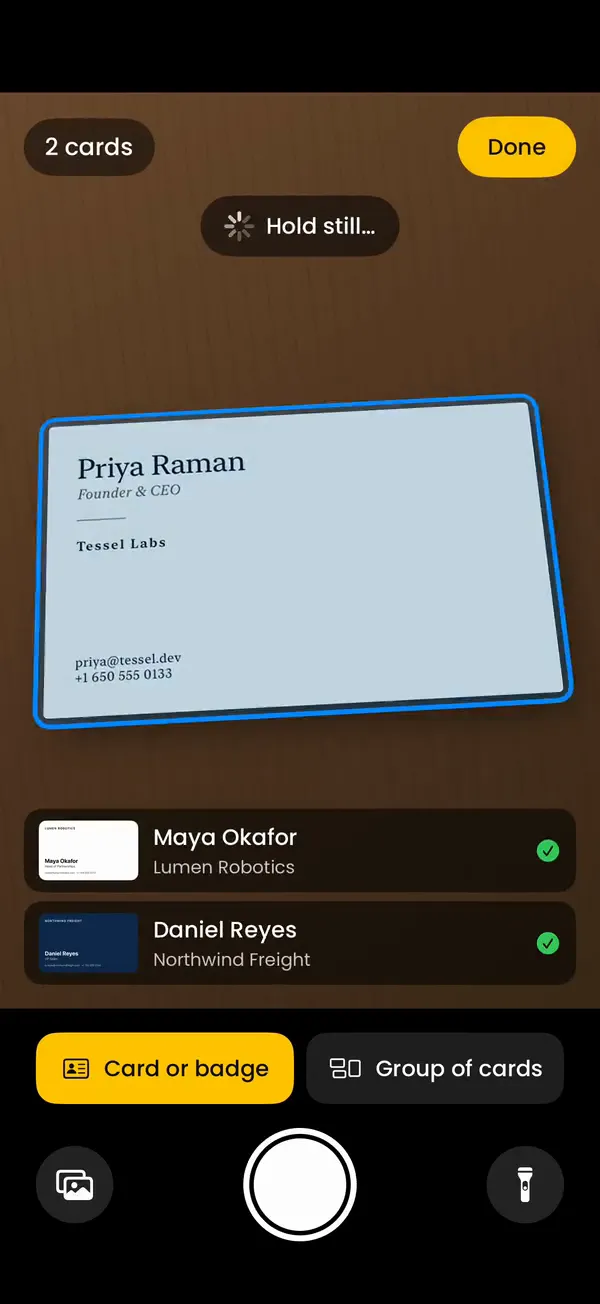
Tap Scan and hold your iPhone over the table. Lay a card down and Krane takes the picture as soon as the card is still, then reads it while you put down the next one. A shutter button is there if you want it. When the back of a card carries more, add it and both sides go into one contact.
The read
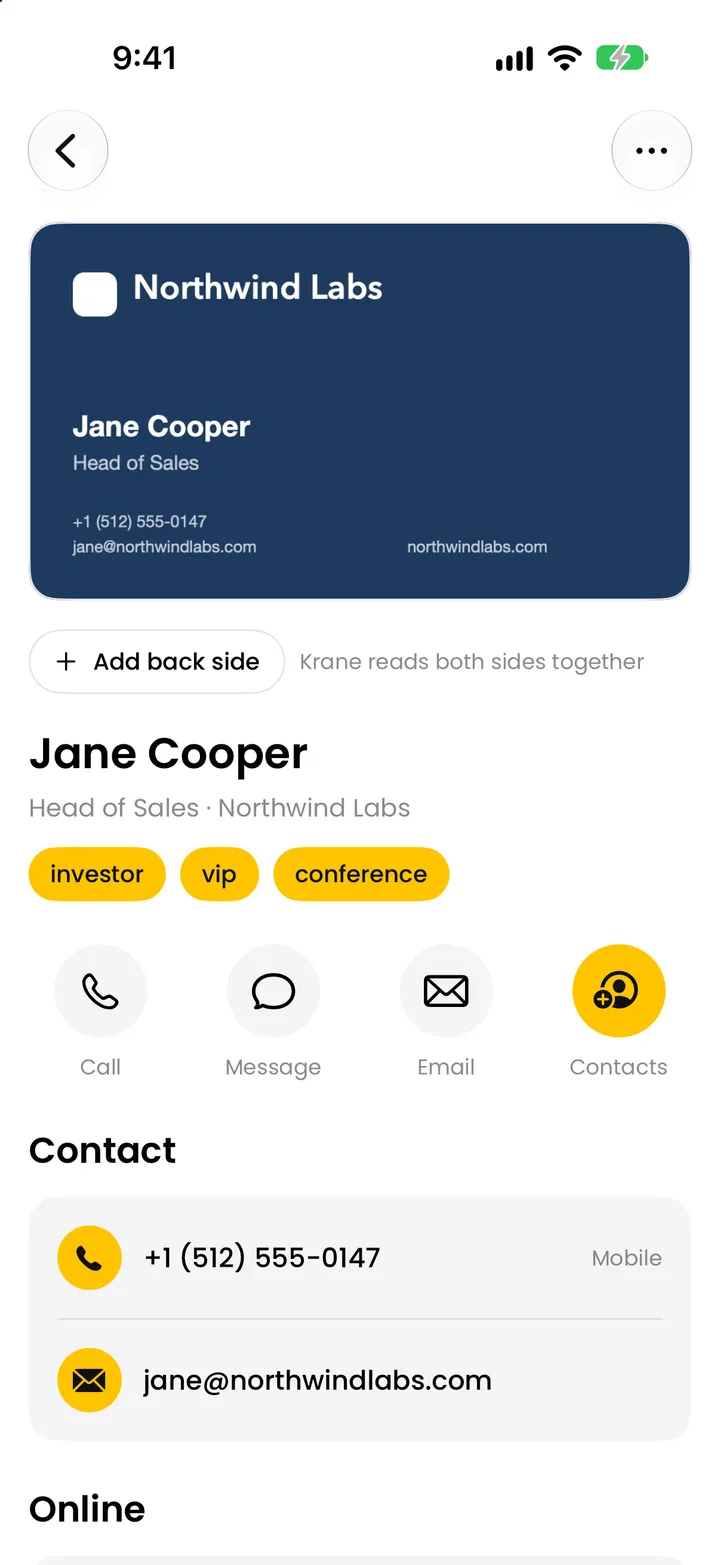
Krane puts the name, job title, company, street address, each phone number with its label, emails, websites and social profiles into separate fields. It reads cards in almost any language and script. With no connection, it reads the card on your iPhone right away and checks it again when you’re back online.
The event
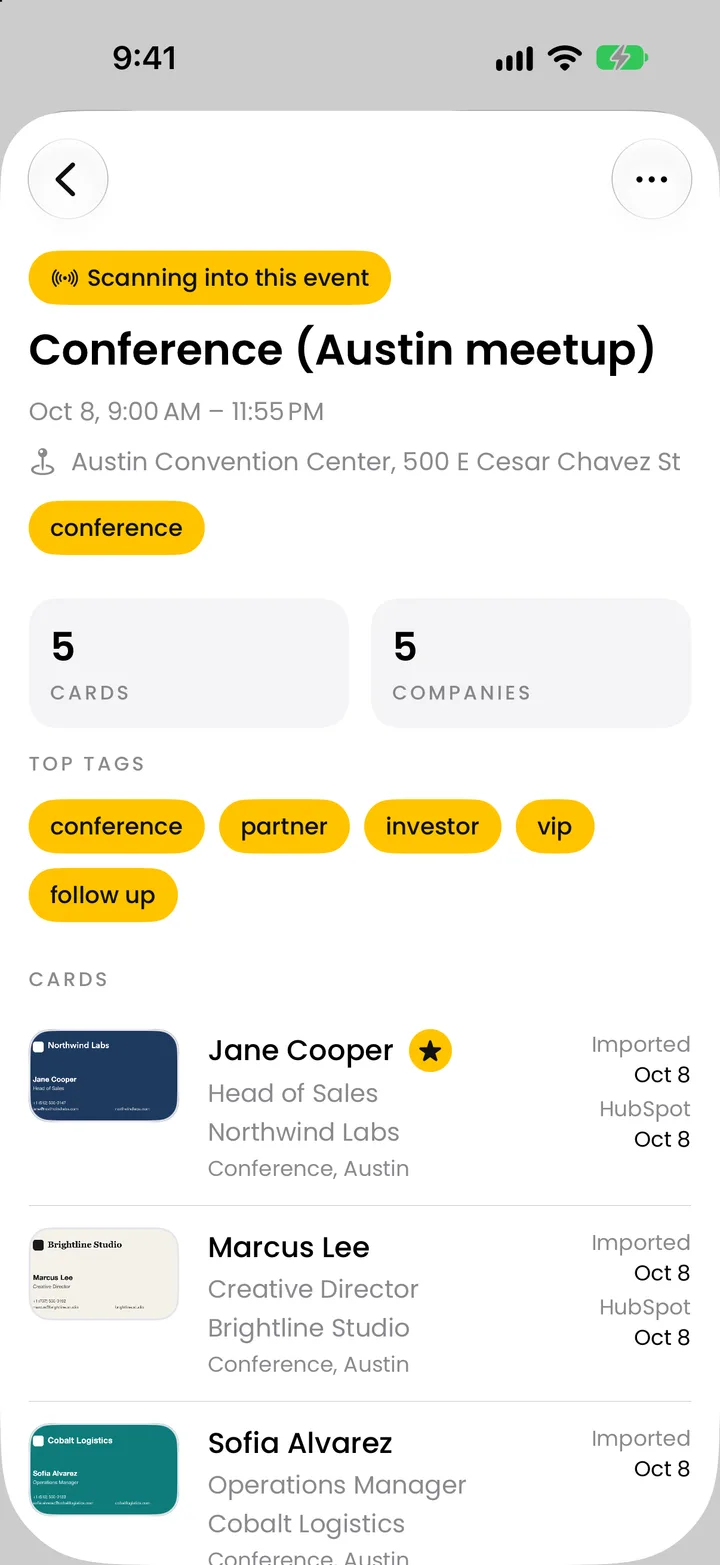
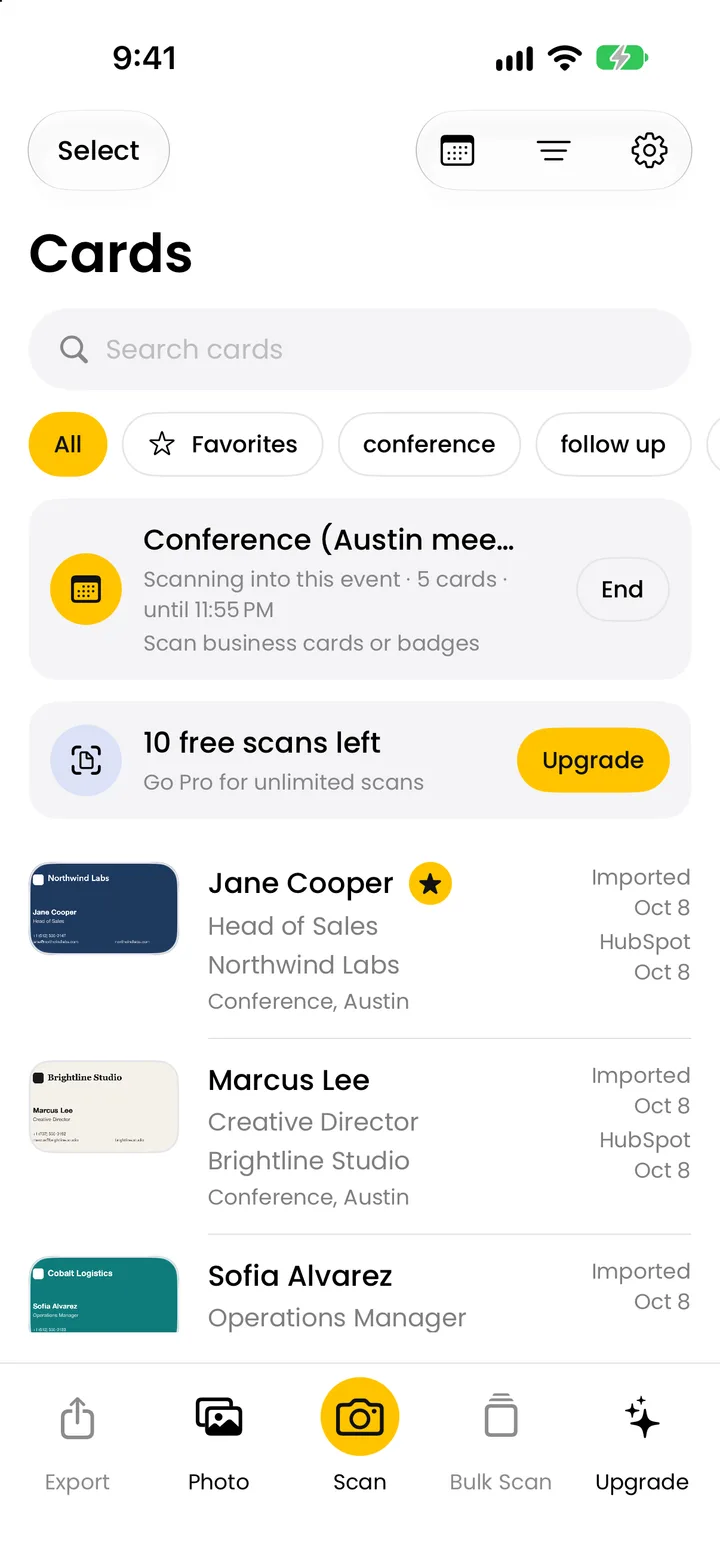
Start an event when you arrive at the venue. Every card and badge you scan until you end it is filed under that event, with “Met at” filled in and the event’s tags added. Add a note and a follow-up date while you still remember what the person asked about.
The send
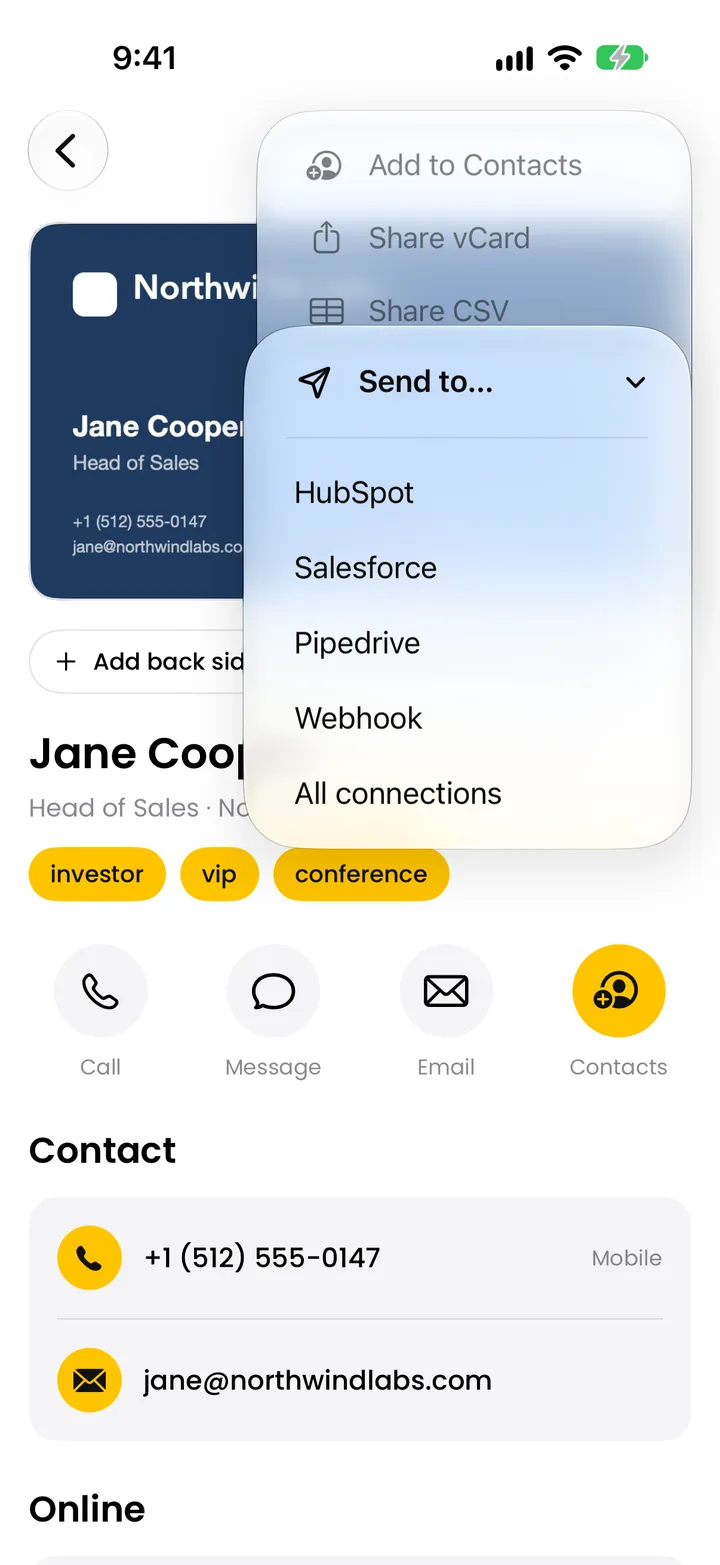
From the card, call or email the person, add them to Apple Contacts, or share a vCard, the standard contact file. With Krane Pro, send the card to HubSpot, Salesforce, Pipedrive or a webhook, or export the whole event as a CSV that opens in Excel. More on the business card scanner page.
What Krane reads
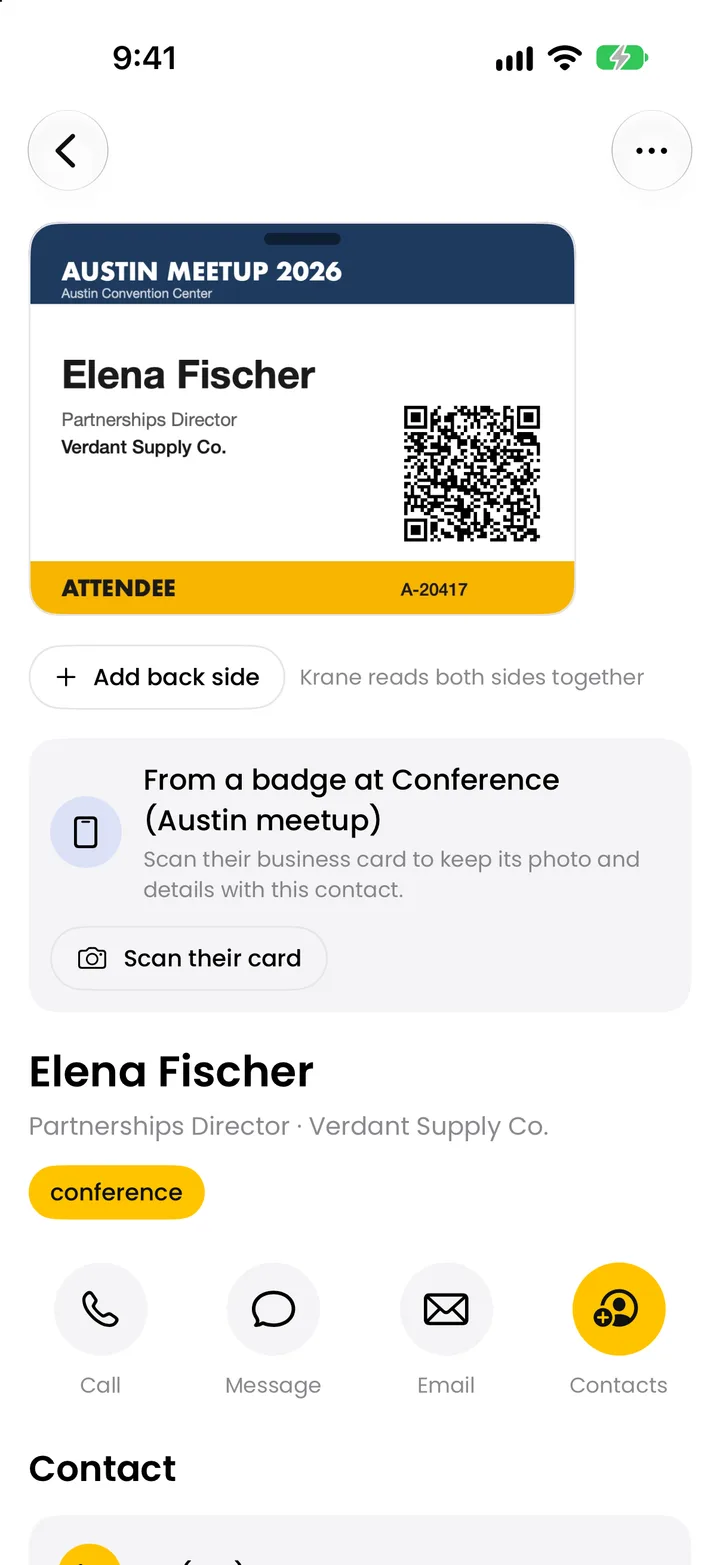
Krane reads cards in almost any language and script, including Japanese, Chinese and Korean. When a name is printed in a non-Latin script, Krane adds a Latin spelling and keeps the original next to it. Event badges go through the same camera. Krane reads the printed text and the code on the badge, then merges the two into one contact.
| From a business card | From an event badge | |
|---|---|---|
| Name | Person name, with a Latin spelling for non-Latin scripts | Printed name |
| Title | Job title | Printed title |
| Company | Company name | Printed company |
| Contact details | Phones labelled mobile, work, fax or other; emails; websites; social profiles; street address | Whatever the code holds: vCard, MeCard, email, phone or URL |
| Event and role | “Met at”, from the event you started | Event name; role such as attendee, exhibitor, speaker, press or sponsor |
| Codes | None | QR, PDF417, Aztec and other common barcodes |
| Other | Anything else on the card, saved as additional info | Badge number, exported as a Badge ID column |
Krane can’t decode the encrypted badge codes some shows use, but it still saves the printed name, title, company and event; the badge scanner page has the details.
Built for the show floor

Start the event when you get to the venue, from the app or by asking Siri. Between conversations, scan the card or badge each visitor hands you. It is filed under the event with your tags and where you met.
Exhibition halls often have weak cell signal and slow Wi-Fi. Krane reads each scan on the iPhone itself, so you aren’t waiting on the network while the next visitor stands in front of you. When the phone is back online, Krane checks each card again and upgrades the fields. You don’t rescan anything.
Scan the same person twice and Krane flags the duplicate; one tap merges the two records. A badge often has no email or phone. Scan the person’s business card as well and it joins the same contact.
For the cards left on the table at closing time, switch the camera to “Group of cards” with Krane Pro, spread them out and take one photo. Krane makes a separate contact for every card in the picture and files them all under the event.
Set a follow-up reminder on the cards that matter; the reminder opens that card, with your note on it. The event screen lists the show’s cards, companies and top tags, and exports them in one go. The trade show lead capture page walks through a full show.
Into your CRM
CRM sync is part of Krane Pro.
HubSpot
Krane creates a contact, or updates the contact that already has the same email. It fills first and last name, email, phone, mobile phone, fax, company, job title, website and address. The event, where you met, tags and notes stay in Krane and are not sent to HubSpot. You connect with a HubSpot private app token.
Salesforce
Sign in with your Salesforce account and choose whether Krane creates Leads or Contacts. A record with the same email is updated. Krane fills name, title, email, phone, mobile, fax and street, plus company and website on a Lead, and sets LeadSource to “Krane”. The event name, where you met, tags and notes go into the Description field.
Pipedrive
Krane creates a person, or updates the person with the same email. When the card has a company, Krane links the organization with that name, or creates it. Emails and phones keep their labels. A note headed “Scanned with Krane” carries the position, event, where you met, tags and notes. You connect with your Pipedrive API token.
Webhook
For any other system, Krane posts each card as JSON, a plain structured text format, to a URL you choose: a Zapier, Make or n8n workflow, or your own server. Add a shared secret and Krane signs each request, so the receiving end can check where it came from. It can include the card image.
Native sync
- HubSpot
- Salesforce
- Pipedrive
By signed webhook
 Zapier
 Make
Make n8n
n8n Zohovia Zapier
On the phone and in files
 ExcelCSV
 Google SheetsCSV
- Apple Contacts
- vCard
Coming soon
 Outlook
 Dynamics 365
 Slack
Slack monday.com
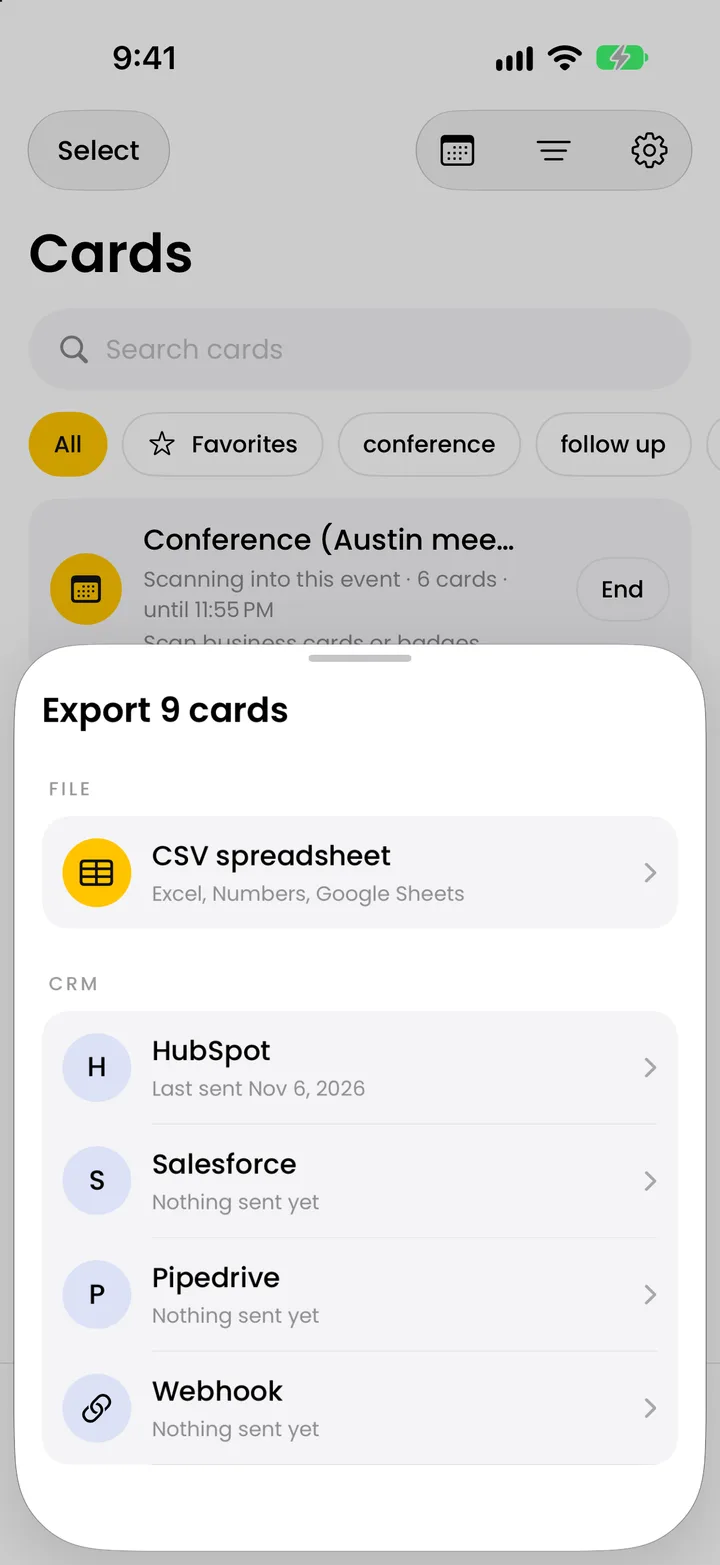
You can send one card, a selection or a whole event. Or turn on “Send new scans automatically” for a connection before the show, and each new scan goes out without another tap. Krane never sends empty fields, so a push can’t blank out data already in the CRM. After a push the card keeps a link to the record. Your tokens stay on the iPhone, and the app talks to the CRM directly, with no Krane server in between.
Without a CRM, you can still use the free plan to add cards to Apple Contacts or share them as vCards. With Krane Pro, export a CSV that opens in Excel, Numbers and Google Sheets.
Who uses Krane

Sales reps
Sales reps at trade shows and conferences scan each visitor between conversations and add a note while the talk is fresh. With automatic sending turned on in Krane Pro, every new scan reaches HubSpot, Salesforce or Pipedrive without another tap, so the follow-up email can go out the same afternoon.

Event marketers
Event marketers who run the booth and own the follow-up list get each show as its own list: every card and badge scanned there, with its tags and where you met. From the event screen they export a CSV or send the whole event to the CRM, and the next show starts a new list.

Founders and small teams
Founders and small teams come home from meetups and dinners with a handful of cards. Krane reads them into named fields, so nobody types names and numbers into Pipedrive or HubSpot. On the free plan the cards go to Apple Contacts; with Krane Pro they go straight to the CRM.
Your cards stay on your phone
Krane has no account and no sign-up. Your cards and your CRM tokens are stored on the iPhone. You can back everything up to a single file and restore it any time.
Cards show up in the iPhone’s Spotlight search. Siri and Shortcuts can scan a card or start an event.
The app is in eight languages: English, German, Japanese, French, Korean, Spanish, Italian and Brazilian Portuguese. What Krane collects and why is in the privacy policy.
Free to start
The free plan gives you 10 scans in a rolling seven-day week and every feature that doesn’t involve a CRM or a spreadsheet. Krane Pro is an auto-renewing subscription, monthly or yearly. The App Store shows the current price.
Free and Krane Pro compared
| Free | Krane Pro | |
|---|---|---|
| Scans | 10 per rolling 7-day week | Unlimited |
| Card after card | 3 in a row per session | Yes |
| Group of cards from one photo | No | Yes |
| Events, tags, notes, reminders | Yes | Yes |
| Badges | Yes | Yes |
| Offline reading | Yes | Yes |
| Apple Contacts and vCard | Yes | Yes |
| CSV export | No | Yes |
| CRM sync | No | HubSpot, Salesforce, Pipedrive, webhook |
| Auto-send of new scans | No | Yes |
Common questions
General
What is Krane? Krane is an iPhone and iPad app that scans business cards and event badges and files each contact under the event where you met. You can add contacts to Apple Contacts on the free plan, or with Krane Pro send them to HubSpot, Salesforce, Pipedrive or a webhook.
Can't my iPhone already scan business cards? Partly. The iPhone’s Live Text lets you copy text from a card, or tap one detected item such as a phone number or an email. It doesn’t build a contact with every field filled in. Krane reads the whole card from one shot into a contact with name, title, company, phones, emails, website and address. The guide on how to scan business cards on iPhone compares Live Text, Notes and Krane step by step.
Where do scanned business cards go on my iPhone? They go into Krane’s own list on your iPhone, filed under the event if one is running, and you can find them from Spotlight search. From a card you can add it to Apple Contacts or share it as a vCard, the standard contact file. With Krane Pro you can also send it to your CRM or export a CSV.
Is Krane free? Krane is free for 10 scans in a rolling seven-day week, with events, tags, notes, reminders, badge scanning, offline reading and Apple Contacts. Krane Pro is a subscription that adds unlimited scans, group scan, CSV export, CRM sync and automatic sending. The App Store shows the price.
Scanning
Does Krane read both sides of a card? Yes. Open the card and add the back. Krane reads it into the same contact, so a card with English on the front and Japanese on the back stays one record. Both images are kept with the card.
Can I scan a stack of business cards at once? Yes, with Krane Pro. Switch the camera to “Group of cards”, spread the cards on a table and take one photo; each card becomes its own contact. You can also lay cards down one at a time and Krane shoots each one when it is still. The free plan allows three in a row per session.
Does it read Japanese, Chinese or Korean cards? Yes. Krane reads cards in almost any language and script, including Japanese, Chinese and Korean. When a name is printed in a non-Latin script, Krane adds a Latin spelling and keeps the original next to it.
Does Krane work without internet? Yes. With no connection, Krane reads the card or badge on your iPhone right away and marks it provisional. When you’re back online it checks the card again and upgrades the fields. You don’t need to scan anything twice.
Can I scan cards from photos I already took? Yes. Pick a photo of a card from your library, or select several photos at once, and Krane reads each card into its own contact. Library photos go through the same read as a camera scan: on your iPhone right away, then checked again when you’re back online.
Can I start a scan with Siri or Shortcuts? Yes. Krane adds two actions to Siri and the Shortcuts app: scan a card, and start an event. You can ask Siri to start the event as you walk into the venue, or put either action in a shortcut on your Home Screen so the camera is one tap away.
Trade shows
Can Krane scan trade show badges? Yes. Krane reads the printed name, title, company and event, and decodes QR, PDF417, Aztec and other common barcodes. Contact details in the code are merged with the print into one contact. Encrypted badge codes can’t be decoded, but the printed details are still saved.
What happens if I scan the same person twice? Krane flags the second scan as a duplicate and offers a one-tap merge, so the person stays one contact. A badge and a business card work the same way: if the badge has no email or phone, scan the person’s card and it joins the contact from the badge.
CRM and export
Which CRMs does Krane connect to? With Krane Pro, Krane sends cards to HubSpot, Salesforce and Pipedrive. For any other system, a webhook posts each card as JSON to a URL you choose, such as a Zapier, Make or n8n workflow. You can also export a CSV and import it.
Does Krane update contacts that are already in my CRM? Yes. If HubSpot, Salesforce or Pipedrive already has a record with the same email, Krane updates it instead of creating a second one. Empty fields on the card are never sent, so a push can’t blank out data that is already in the record.
Does Krane create Leads or Contacts in Salesforce? You choose. Krane creates a Lead by default, or a Contact if you change the setting, and updates a record that has the same email. LeadSource is set to “Krane”. The event name, where you met, your tags and your notes go into the Description field. You connect by signing in with your Salesforce account.
How does the webhook work with Zapier, Make or n8n? With Krane Pro, Krane posts each card as JSON, a structured text format, to a URL you choose: a webhook trigger in Zapier, Make or n8n, or your own server. If you set a shared secret, each request carries a signature your workflow can check. You can include the card image.
Does Krane work with Outlook or Dynamics 365? There is no Outlook or Dynamics 365 connector. If your iPhone has an Exchange account, add the card to Apple Contacts and save it to that account. With Krane Pro you can also import Krane’s CSV, or send each card through a Zapier, Make or n8n webhook that creates the record.
Can I export business cards to Excel? Yes, with Krane Pro. Export one event or all your cards as a CSV that opens in Excel, Numbers and Google Sheets. Each field has its own column, phones and emails are numbered, and the headers are in English on every device.
Privacy and devices
Do I need an account? Where are my cards stored? You don’t need an account, and there is no sign-up. Your cards and CRM tokens are stored in the app on your iPhone or iPad. You open Krane and start scanning; the only credentials are the ones your CRM gives you when you connect it.
Do my contacts pass through Krane's servers on the way to my CRM? No. CRM pushes go from the app straight to HubSpot, Salesforce, Pipedrive or your webhook URL, and your tokens stay on the iPhone. Reading the card is a separate step: Krane checks each scan again when you’re back online, so that step does use the internet.
Can I back up my cards? Yes. Krane backs up everything to one file, which you can keep in iCloud Drive, the Files app or anywhere else you store documents. You can restore it any time, on the same iPhone or on a new one.
What languages is the app in? The app is in eight languages: English, German, Japanese, French, Korean, Spanish, Italian and Brazilian Portuguese. That is separate from the cards it reads, which can be in almost any language and script.
Does Krane work on iPad or Android? Krane runs on iPhone and iPad as one universal app, so both versions come from the same App Store page. It needs iOS 18.1 or later. There is no Android, Mac, Windows or web version.
Get Krane
Scan the cards from your next show and send them to your CRM from the hall.
Download on the App Store