Compare · Business card scanner and digital card
Krane vs CamCard
CamCard is INTSIG’s card scanner and digital business card, sold as “CamCard AI Business Assistant” on iPhone, Android, Mac and the web. Krane scans cards and badges on iPhone, iPhone Duo and iPad and sends them to HubSpot, Salesforce or Pipedrive.
Facts about CamCard checked on its own pages, November 8, 2026
Drawing: a stack of scanned business cards, the top one stamped Proofread, for CamCard's human proofreading option, and a note that the free plan has 5 high-accuracy scans a week.
Drawing: a paper business card for Jane Cooper, Head of Sales at Northwind Labs, read by Krane into a contact with the name, title, company, mobile number, email and website each in its own field.
- Free plan
- CamCard100 cards; 5 high-accuracy scans a week; no export or CRM; ads
- Krane10 scans a week, no account
- Paid plan (US)
- CamCardPremium $9.99 a month, Pro $24.99 a month on the website (App Store lists $4.49, $8.49, $49.99 a year)
- Krane$11.99 a month or $95.99 a year
- Native CRM sync
- CamCardSalesforce on Premium and Pro; HubSpot, Dynamics, Zoho on CamCard Business
- KraneHubSpot, Salesforce, Pipedrive (Pro)
The short answer
Pick CamCard if you need Android, a Mac or web version, a digital card of your own, or a team database with an admin. Pick Krane if you scan badges at trade shows, want each show filed as its own event, or want HubSpot or Pipedrive sync for one person.
CamCard’s plans count “high-accuracy” scans: 5 a week on Basic, 200 a month on Premium, 1,000 a month on Pro. Krane Pro has one kind of scan and no cap. CamCard’s Salesforce, Google and Outlook sync start on Premium; HubSpot, Dynamics and Zoho need CamCard Business, which is priced on request. Krane connects to HubSpot, Salesforce and Pipedrive with Krane Pro, and runs only on iPhone, iPhone Duo and iPad.
When CamCard is the better pick
- You’re on Android, or want your contacts on a Mac, in a browser or on visionOS. Krane runs only on iPhone, iPhone Duo and iPad.
- You want a person to check your scans. CamCard’s Artificial Proofreading has staff correct the data read from each card.
- You want a digital card of your own. CamCard includes three free, with templates and email signatures.
- You run a team. CamCard Business has a shared card database, role permissions and SSO, priced on request.
- Your CRM is Dynamics, SugarCRM or Zoho. CamCard Business lists them; Krane reaches them only by webhook or CSV.
Paid plans also export to Excel and vCard.
CamCard's siteWhen Krane is the better pick
- You scan badges. Krane reads the printed badge and its QR, PDF417 or Aztec code; CamCard’s pages don’t mention badges.
- You work several shows a year. Krane files each scan under its event; CamCard sorts cards into groups and tags.
- You want no cap on scans. Krane Pro has none; CamCard counts high-accuracy scans on every plan.
- You want HubSpot or Pipedrive as one person. Krane Pro sends to both; on CamCard, HubSpot needs the Business edition.
- You don’t want an account or ads. Krane has neither; cards and CRM tokens stay on the iPhone.
Krane makes no digital card and has no Android, Mac or web version.
Side by side
CamCard and Krane, feature by feature
| Feature | CamCard | Krane |
|---|---|---|
| What it is | Business card scanner, digital card and AI assistantsource | A business card and badge scanner |
| Platforms | ✓ iPhone, iPad, Android, Mac, web (Business)source | ◐ iPhone, iPhone Duo and iPad |
| Works without an account | ? Unknown | ✓ Yes, there is no account at all |
| Free plan | ◐ 100 cards; 5 high-accuracy scans a week; no export or CRM; adssource | ✓ 10 scans a week, no account |
| Paid plan (US) | Premium $9.99 a month, Pro $24.99 a month on the website (App Store lists $4.49, $8.49, $49.99 a year)source | $11.99 a month or $95.99 a year |
| How paper cards are read | ✓ AI recognition; human proofreading offered as a plan featuresource | ✓ Read on the iPhone at once, checked again online; every field filled |
| Several cards at once | ◐ Bulk scanning with desktop scanners on CamCard Businesssource | ✓ Card after card; a group of cards from one photo (Pro) |
| Reads cards with no signal | ? Unknown | ✓ Yes, read on the iPhone, checked again when back online |
| Event badges | ? Reads CamCard QR codes; event badges not mentionedsource | ✓ QR, PDF417, Aztec and other codes, merged with the printed name |
| Cards filed by event | ◐ Groups and tags; no event feature namedsource | ✓ Yes: every scan during an event is filed under it |
| Native CRM sync | ◐ Salesforce on Premium and Pro; HubSpot, Dynamics, Zoho on CamCard Businesssource | ✓ HubSpot, Salesforce, Pipedrive (Pro) |
| Zapier or webhook | ◐ Open API on CamCard Business; Zapier not mentionedsource | ✓ Signed webhook for Zapier, Make, n8n (Pro) |
| Export to Excel / CSV | ◐ Excel and VCF on paid planssource | ✓ CSV of one event or all cards (Pro) |
| Where your contacts live | CamCard's cloud (servers in America, Europe, Japan and China)source | On your iPhone; backup to one file |
| Team admin | ✓ CamCard Business: shared database, roles, SSOsource | ✕ No: each person on their own Apple Account |
| Digital business card | ✓ Yes: templates, QR, email signaturesource | ✕ No; shares any card as a vCard |
CamCard: read on CamCard's own website, help pages and App Store listing on November 8, 2026; "Unknown" means we couldn't confirm it there. Prices are US list prices; plans change, so check CamCard before you buy. Krane Pro's price is the US price; the App Store shows the price for your account and country. Something wrong or out of date? Write to [email protected].
What CamCard is, and what Krane is
CamCard comes from INTSIG, the company behind CamScanner. Its App Store listing is now “CamCard AI Business Assistant” and leads with AI voice transcription of meetings and “AI Business Insights” about the companies you meet. Under that sit the card scanner, a digital business card with templates, email signatures and a lead capture form, and cloud sync across iPhone, Android, Mac and visionOS. A separate product, CamCard Business, adds a team database, admin controls and more CRM targets, with a web app and pricing on request.
Krane does one job. It reads the cards and badges people hand you, on iPhone, iPhone Duo and iPad, files them under the event you’re at, and sends them to Apple Contacts, a CSV, or HubSpot, Salesforce or Pipedrive. There is no account; contacts stay on the device and back up to one file.
The difference is in kind. CamCard is a business assistant with a scanner in it. Krane is the scanner.
Scanning paper cards
CamCard calls its reader AI card recognition with auto-correction, and its pricing page counts the reads. Basic lists “100 cards” and 5 high-accuracy AI scans a week. Premium lists unlimited cards and 200 high-accuracy scans a month; Pro lists 1,000. Its Artificial Proofreading option has people check and correct the data. CamCard’s homepage says it supports 16 languages. You pick recognition languages in settings; its camera tips advise one to three, since more lower the recognition rate. Whether the individual app reads several cards in one frame, its pages don’t say; bulk scanning from desktop scanners is a CamCard Business feature.
Krane reads a card into named fields: person name, job title, company, phone numbers labeled mobile, work, fax or other, email addresses, websites, social profiles, street address and anything else printed. It reads almost any language and script, including Japanese, Chinese and Korean, and adds a Latin spelling to names in another script. Add the back of a card and both sides go into one contact.
For a stack, hold the iPhone over the table and lay cards down one at a time. The business card scanner shoots each card once it is still and reads it while you set down the next. Free users scan three in a row per session and 10 cards per rolling seven-day week. With Krane Pro there is no cap, and Group of cards mode reads a whole spread from one photo.
At trade shows and events
CamCard’s pages describe QR codes: scanning another person’s CamCard QR code, and reading business cards through QR codes. They don’t mention event badges or an event feature; cards are sorted into groups and tags. Whether the app reads a card with no signal is not stated.
Krane’s badge scanner reads the printed name, title, company, event name, badge role and badge number, and decodes QR, PDF417 and Aztec codes and other common barcodes. Contact data in the code is merged with the print into one contact. If the badge carries no email or phone, scan the person’s card and it joins the same contact. Encrypted badge codes can’t be decoded; Krane still saves the printed name, title, company and event.
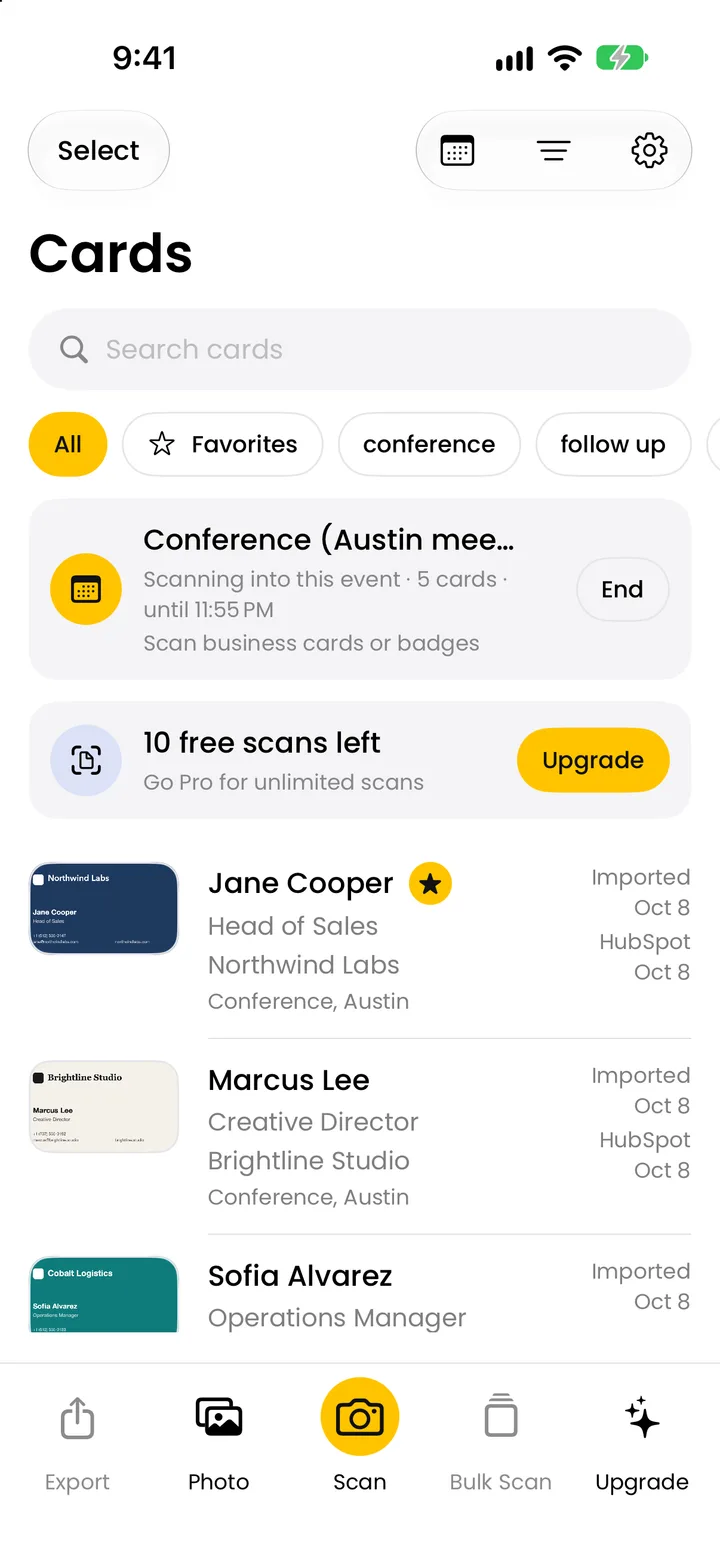
Krane’s trade show lead capture runs on the free plan. Start an event when you reach the venue and every card and badge you scan is filed under it, with “Met at” and the event’s tags filled in. The event screen lists its cards, companies and top tags, and with Krane Pro exports them in one go. Venue Wi-Fi is often weak, so Krane reads each card on your iPhone right away and checks it again when you’re back online.
Getting contacts into your CRM
CamCard’s Premium and Pro plans sync to Salesforce, Google Contacts and Outlook. Premium caps Salesforce sync at 1,000 a month; Pro has no cap. HubSpot, Microsoft Dynamics, SugarCRM and Zoho are on CamCard Business, plus an Open API. CamCard’s pages don’t mention Zapier. Paid plans export Excel and vCard; CSV isn’t listed.
Krane sends to HubSpot, Salesforce and Pipedrive with Krane Pro, from the app, with your tokens stored on the iPhone. In HubSpot it creates a contact, or updates the one with the same email; the event, tags and notes stay in Krane. In Salesforce it creates a Lead or a Contact, sets LeadSource to “Krane” and writes the event, where you met, tags and notes into Description. In Pipedrive it creates a person, links or creates the organization named on the card, and adds a note “Scanned with Krane” with the position, event, tags and notes. Empty fields are never sent, so a push can’t blank data in the CRM.
A signed webhook posts each card as JSON to Zapier, Make, n8n or your own server. You can send one card, a selection, a whole event, or every new scan automatically. CSV export, of one event or all cards, opens in Excel, Numbers and Google Sheets.
Price
| Plan | CamCard | Krane |
|---|---|---|
| Free plan | Basic: 100 cards, 5 high-accuracy scans a week, 3 digital cards, with ads | 10 scans a week, with events, badges, tags, notes and Apple Contacts |
| Paid plan | Premium $9.99 a month or Pro $24.99 a month; CamCard Business priced on request | Krane Pro: $11.99 a month or $95.99 a year (US) |
| What the paid plan adds | Unlimited cards; 200 (Premium) or 1,000 (Pro) high-accuracy scans a month; Salesforce, Google and Outlook sync; Excel and vCard export; backup; no ads | Unlimited scans, group scan, CSV export, HubSpot, Salesforce, Pipedrive and webhook sync, auto-send |
CamCard’s prices are as listed on its website on November 8, 2026. Its US App Store listing that day shows different in-app purchases ($4.49, $8.49, and $49.99 a year) without saying which plan each belongs to. Premium comes with a 3-day free trial. Krane Pro has no trial; try the free plan first. The App Store shows the price for your account and country. Krane’s pricing page lists what each plan includes.
Where your contacts live
CamCard saves cards to its cloud server with 256-bit encryption, in data centers in America, Europe, Japan and China, so the same contacts appear on your phone, Mac and the web. Backup Contacts is a paid feature. Whether you must create an account to use the app, CamCard’s current pages don’t say.
Krane has no account. Cards, events and CRM tokens are stored on your iPhone, iPhone Duo or iPad, and you back everything up to one file you can restore any time. CRM pushes go from the app straight to HubSpot, Salesforce or Pipedrive. Each card is read on your iPhone first, right away, and checked again when you’re back online.
Switching
Switching from CamCard to Krane
- Keep what’s in CamCard. On a paid plan, export your contacts to Excel or vCard before it lapses. Krane has no importer, so that file is your archive; a vCard can be added to Apple Contacts.
- Install Krane and scan the next card you’re handed. There is no account to create, and the first 10 scans a week are free.
- Add photos of old cards from your photo library, several at once.
- With Krane Pro, connect HubSpot, Salesforce or Pipedrive in Settings and turn on “Send new scans automatically” if you want each scan pushed as it lands.
If you keep CamCard for your own digital card, run both: CamCard for the card you hand out, Krane for the cards you’re handed.
FAQ
Questions about Krane and CamCard
Is Krane a good CamCard alternative?
For scanning the cards and badges you’re handed, yes. Krane reads cards on iPhone, iPhone Duo and iPad, files them by event, and sends them to HubSpot, Salesforce or Pipedrive with Krane Pro. It has no digital card, no Android or Mac version and no team edition, so it does not replace those parts of CamCard. Other apps are on the all comparisons page.
Is CamCard free?
CamCard’s Basic plan is free. As listed on November 8, 2026, it includes 100 cards, 5 high-accuracy AI scans a week and up to 3 digital cards, and it shows ads. Export, CRM sync and backup are on the paid plans. Krane’s free plan is 10 scans a week, with events, badges, tags, notes, reminders and Apple Contacts included.
Which is cheaper, CamCard or Krane?
CamCard’s website lists Premium at $9.99 a month and Pro at $24.99 a month, as of November 8, 2026; its US App Store page lists $4.49, $8.49 and $49.99 a year without naming the plan for each. Krane Pro is $11.99 a month or $95.99 a year (US). The App Store shows the price for your account and country, so compare there before you decide.
Does CamCard scan business cards?
Yes. Card scanning is where CamCard started, and it is still in the app alongside the digital card and the AI voice transcription. Its pricing page counts scans as “high-accuracy AI scans”, 5 a week on Basic, 200 a month on Premium and 1,000 a month on Pro, and its Artificial Proofreading option has people check the data read from each card.
Which one works without internet?
Krane does. With no signal, Krane reads the card on your iPhone right away and checks it again when you’re back online, so a scan never waits on venue Wi-Fi. CamCard’s pages don’t say whether the app reads a card offline, so if that matters to you, test it on the free plan before a show.
Can CamCard and Krane scan trade show badges?
Krane does. It reads the printed name, title, company, event name, badge role and badge number, and decodes QR, PDF417 and Aztec codes. Encrypted codes can’t be decoded; Krane still saves the printed details. CamCard’s pages mention scanning QR codes, including another person’s CamCard QR code, but don’t mention event badges.
Which CRMs do CamCard and Krane connect to?
CamCard Premium and Pro sync to Salesforce, Google Contacts and Outlook. CamCard Business adds HubSpot, Microsoft Dynamics, SugarCRM and Zoho, with pricing on request. Krane connects to HubSpot, Salesforce and Pipedrive with Krane Pro, plus a signed webhook for Zapier, Make, n8n or your own server. Other systems reach Krane’s data through CSV, Apple Contacts or that webhook.
Do I need an account to use Krane?
No. Krane has no sign-up. Cards, events and CRM tokens are stored on your iPhone, iPhone Duo or iPad, and you back everything up to one file you can restore on a new device. Your Krane Pro subscription is tied to your Apple Account and can be restored from the app’s Settings.
Does Krane work on Android?
No. Krane runs on iPhone, iPhone Duo and iPad with iOS 17.6 or later, and there is no Android, Mac, Windows or web version. CamCard has apps for iOS, Android, Mac and visionOS, and CamCard Business has a web app, so if you need the same contacts on an Android phone, CamCard is the one to pick.
Can I move my contacts from CamCard to Krane?
Not as a file. Krane has no importer for CSV, vCard or another app’s export. Export your CamCard contacts to Excel or vCard on a paid plan to keep them, and scan new cards with Krane from now on. If you still have photos of old cards, add them from your photo library; Krane reads several at once.
What is CamCard's high-accuracy scanning limit?
As listed on November 8, 2026: 5 high-accuracy AI scans a week on Basic, 200 a month on Premium and 1,000 a month on Pro. Basic also lists “100 cards”. Krane has one kind of scan, 10 a week free and no cap with Krane Pro.
Read the cards you're handed, straight into a contact.
Free for 10 scans a week. Krane Pro adds unlimited scans, export and CRM sync.
On a computer? Point your iPhone camera at the code, or text me the link.