Free tools
Free tools for business cards and contacts
Four free tools for business cards and contacts, made by the maker of Krane. They run in your browser: nothing you type or drop in is uploaded, and there is no sign-up.
Every tool runs in your browser. Nothing is uploaded, no account.
- A QR code for your card
Business card QR code generator
Type your details and this page makes a QR code for business cards and badges. A phone camera scans it and offers to save you as a contact. Free, no account, nothing uploaded.
Open the tool - Open a .vcf, export contacts to CSV
Open a VCF file and convert it to CSV
Open a .vcf (vCard) file to see every contact, download them as a CSV for Excel, Google Sheets or a CRM, or turn a CSV into a .vcf. The file stays in your browser.
Open the tool - HTML signature with a QR
Free email signature generator and templates with a QR code
Fill in your details, pick one of four templates, add your logo by its web address and copy the signature into Gmail, Outlook or Apple Mail. Free, with no sign-up.
Open the tool - Cost per lead, ROI, break-even
Trade show ROI and cost per lead calculator
A cost per lead calculator and ROI calculator for a trade show, conference or any event. Type your own costs and results over the example numbers to get cost per deal, ROI and break-even.
Open the tool
Why these tools are free
The tools come from the maker of Krane, the business card scanner for iPhone, iPhone Duo and iPad. Each does one small job around a card or a contacts file: a QR code for the card you print, a .vcf opened and turned into a spreadsheet, a signature for your mail app built from a template, a show’s cost worked out per lead. People search for one of those jobs, find the tool, and some of them later look at the app. That is why they are free.
They also cost little to run. The work happens on your computer or phone, so there is no server doing it for you and no bill that grows with use.
There are no ads on the tool pages. Free business card tools usually sit behind a form that asks for your email before the download button; these have no form, no sign-up, and nothing inside the tool that sells you anything.
Nothing leaves your browser
Each tool is a web page with its code inside it. Once the page has loaded, your computer or phone does the rest: it draws the QR code from the fields you fill, reads the .vcf you drop in, assembles the signature and works out the ROI figures. The tool’s code makes no network calls, so none of that reaches kraneapp.com and the site keeps no copy. A downloaded QR code or CSV is written by your browser straight to your device.
You can check this yourself. Open a tool, let the page finish loading, then turn off Wi-Fi. The tool keeps working because there is nothing left for it to fetch. The one thing that travels is the ROI calculator’s share link, which carries your numbers in the link itself to the person you send it to.
Krane works on the same idea. The app keeps your scanned cards on your iPhone, iPhone Duo or iPad, with no account to create, and the backup is one file you keep.
Krane for iPhone
The cards you collect: Krane
The tools cover the card you hand out and the contacts you already have in a file. The paper cards and badges you are handed are Krane’s job.
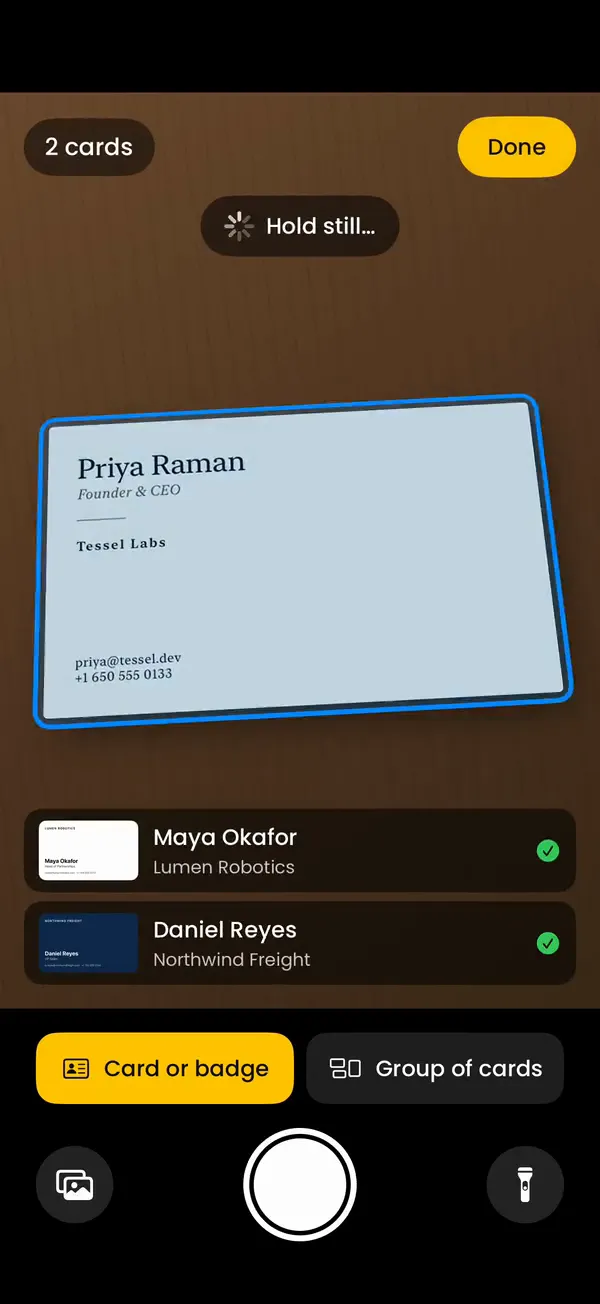
Krane is a business card scanner for iPhone, iPhone Duo and iPad. Photograph a card and it reads the name, title, company, phones, emails, website, social profiles and address into one contact, on the phone right away, and checks it again when you’re back online. Start an event when you reach the venue and every card and badge from that show is filed under it, with where you met and the event’s tags filled in: the trade show lead capture side. The free plan covers 10 scans a week and saves to Apple Contacts. With Krane Pro, scans are unlimited, and you can export a CSV or send contacts to HubSpot, Salesforce or Pipedrive. Both plans are on the pricing page.
FAQ
Questions about the free tools
Are these tools really free?
Yes. All four are free, with no paid version behind them and no limit on how often you use them. They are made by the maker of Krane, the iPhone business card scanner, and they bring people to the site; that is how they pay for themselves. Krane itself has a free plan and a paid one, but the tools are separate from the app.
Do I need an account?
No. There is nothing to log in to, no sign-up, and no email form before the download. Open the tool, use it, download the result. Krane the app has no account either: your cards and CRM tokens are stored on the iPhone, and the backup is a single file you keep.
Is my data uploaded anywhere?
No. The page does its work in your browser, and the tools’ code makes no network calls. The contact details behind your QR code, the .vcf you drop in, the signature you build and the booth costs you type stay on your computer or phone. Turn off Wi-Fi after the page loads and the tool still works, which is the simplest way to see it.
Do the tools work on a phone?
Yes. They run in any current browser, on an iPhone, an Android phone or a computer. The VCF viewer and converter is easiest on a computer, where you can drag the file in, but a phone can pick a .vcf from Files or a mail attachment. The tools are the one part of kraneapp.com that runs on Android and Windows; the Krane app is iPhone, iPhone Duo and iPad only.
Can I import the CSV or vCard into Krane?
No. Krane has no importer for .vcf or CSV files; it fills its list by scanning cards and badges. The converter’s files are for your address book, spreadsheet or CRM: a CSV for Excel, Google Contacts, Outlook, HubSpot or Salesforce, or a .vcf for Apple Contacts. The converter does offer Krane’s own column set, so its file matches a CSV exported from Krane Pro column for column.
Can I suggest a tool?
Yes. Write to [email protected] with the job you want done and, if you have one, a sample file. Small jobs around cards and contacts that can run in a browser with no server are the kind we build. If a tool gives a wrong result, send the input that caused it and we will fix it.
For the cards you're handed, there's Krane.
Free for 10 scans a week. Krane Pro adds unlimited scans, export and CRM sync.
On a computer? Point your iPhone camera at the code, or text me the link.