Free business card maker
Type your details, describe your work in a line and pick one of three designed directions. Download a print-ready PDF with bleed and crop marks. No sign-up.
The card is drawn in your browser. Asking for design ideas sends your brief, name, job title, company and tagline to Krane's server; phone numbers, email and address are not sent. A photo of an old card is sent to Krane's server to be read. Nothing is stored. No account.
Design it sends your brief, name, title, company and tagline.
Three directions
Press Design it and AI lays your card out three ways. Choosing one puts it on the card below.
A sample card. Type your name below, or describe yourself above and press Design it.
Details
Leave out what you don't want printed. Phone numbers, email and address are never sent.
Fine-tune
Every choice works without AI. The card above changes as you pick.
Download
For a print shop: both sides, 1/8 in bleed, crop marks, CMYK, text as outlines.
10 cards on a Letter sheet.
300 dpi, for the web or an online printer that takes images.
For the printer
How to make a card
- Fill in your details. There are ten fields: first and last name, job title, company, an optional tagline, mobile, work phone, email, website and address. Leave empty anything you don’t want printed. Or press Start from your old card, and the business card reader fills the fields from a photo.
- Describe yourself or your business in a line, such as “bookkeeper for restaurants, on my own since 2024”, and press Design it. You can skip this step.
- Pick one of the three directions. Each has a name and one sentence on why it suits you. Choosing one puts it on the card.
- Adjust the layout, type, colors and back by hand. Or ask for a change, such as “warmer” or “less formal”, and get three variations of the card on the desk.
- Read any note under the card. It appears when a line doesn’t fit and says what the tool did about it.
- Download the print PDF and paste the spec line from under the downloads into your order to the print shop.
The same details can go at the foot of your emails with the email signature generator.
Three directions instead of thousands of templates
Template sites give you a blank canvas or a gallery of thousands of designs, and the choosing is yours. This maker works from a small system instead: 10 layouts (one of them upright), 8 type pairings and 12 color schemes, drawn to work together. Any combination you pick will print.
The system makes the small decisions a designer would. Letter pairs are kerned, which means the gap between them is adjusted, as in “To” or “AV”. Capitals get a little extra space; lowercase is left alone. A long name is fitted by stepping its size down, never by squeezing the letters narrower. Rules are hairlines, and each card has one accent color.
Design it asks an AI model to choose three directions from that system, based on your brief, name, title and company. It answers with the tool’s own layouts, type and colors and draws nothing, which is why every result prints. It writes no text for the card unless your brief asks for a tagline. Every choice can also be made by hand.
What makes the file print-ready
Print shops send files back for screen colors, missing bleed and missing fonts. The print PDF avoids each one.
| What the PDF has | Why a printer wants it |
|---|---|
| CMYK color | Presses print with four inks: cyan, magenta, yellow and black. Screen colors (RGB) get converted at the shop and can shift. Black type is black ink alone, never a mix of four, so small text stays sharp. |
| 1/8 in bleed | Color that runs to the edge is printed past it and trimmed off, because the cutter is never exact. |
| Crop marks | Short lines outside the card that show the cutter where the edge is. |
| Trim and bleed boxes | The file states both sizes, so nobody at the shop has to measure. |
| Text as outlines | The letters are saved as shapes, so the shop needs no fonts and the print matches the preview. |
| Minimum type sizes | Details stay at 6.5 pt or larger, 7 pt for white type on a dark card, where thin strokes fill in. |
On the ivory, cream and kraft schemes the paper color is the stock itself: the PDF leaves it unprinted and the spec line names the stock. The PDF is not a certified PDF/X file, and screen colors are estimates of the inks, so ask for a proof on a large order. See the business card dimensions and business card paper weight guides.
A PNG of each side comes at 300 dpi: 3.5 in × 300 = 1,050 pixels across a US card, for printers that take images.
Printing at home
The second download is a sheet for a home printer, on Letter or A4. US cards on Letter come 10 to a sheet, placed where Avery 5371 and 8371 perforated card stock is cut. A4 also takes 10. European cards on Letter fit 8, with light cut guides in the margin.
Print at actual size, 100%. “Fit to page” shrinks the sheet a few percent, and the cards drift off the perforations. If the card has a back, the second page holds the backs: print two-sided and flip on the long edge.
Most home printers can’t print to the edge of a sheet, and perforated stock has no bleed. A card with a solid background can show a thin white edge. For a dark card, a print shop does better.
The back of the card
There are five backs: blank, a QR code, your initials as a monogram, the company name as a wordmark with the tagline, or the accent color to every edge with the company name left unprinted.
The QR code holds your contact details as a vCard, the contact format phones read. They are written into the code itself, with no link, so it never expires. A phone camera reads it and offers to save you as a contact.
The Monogram layout puts only your initials on the front and every detail on the back. For a code on its own, use the business card QR code generator.
What is sent, and what isn't
The card and its files are made in your browser. Two buttons send something to Krane.
Design it sends your brief, name, job title, company and tagline, and the number of contact lines you filled in. Phone numbers, email and street address are not sent. Krane doesn’t store or log the brief or the names; it counts each visitor’s requests for the day.
Start from your old card sends the photo to be read and uses one of the business card reader’s three reads a week.
You get 10 design requests a day, free, with no account; they come back at midnight UTC. If the feature’s monthly budget runs out, design ideas pause until next month and the rest of the tool keeps working. Krane’s privacy policy is the general one for the site and the app.
What it doesn't do
The maker takes no logo or other image; the monogram stands in for a logo. There is no free canvas, so you can’t drag items around the card. It doesn’t print cards or order printing for you, and it doesn’t make a digital or NFC card. There is no account either. The card you’re making is kept in your browser’s storage on this device, and it is there when you come back.
Guides for this tool
- Business card dimensions in inches, mm and pixelsEvery card size, every unit
- Business card paper weight in points, pounds and gsmPoints, pounds and gsm for cards
Krane for iPhone
With Krane, the cards you get back
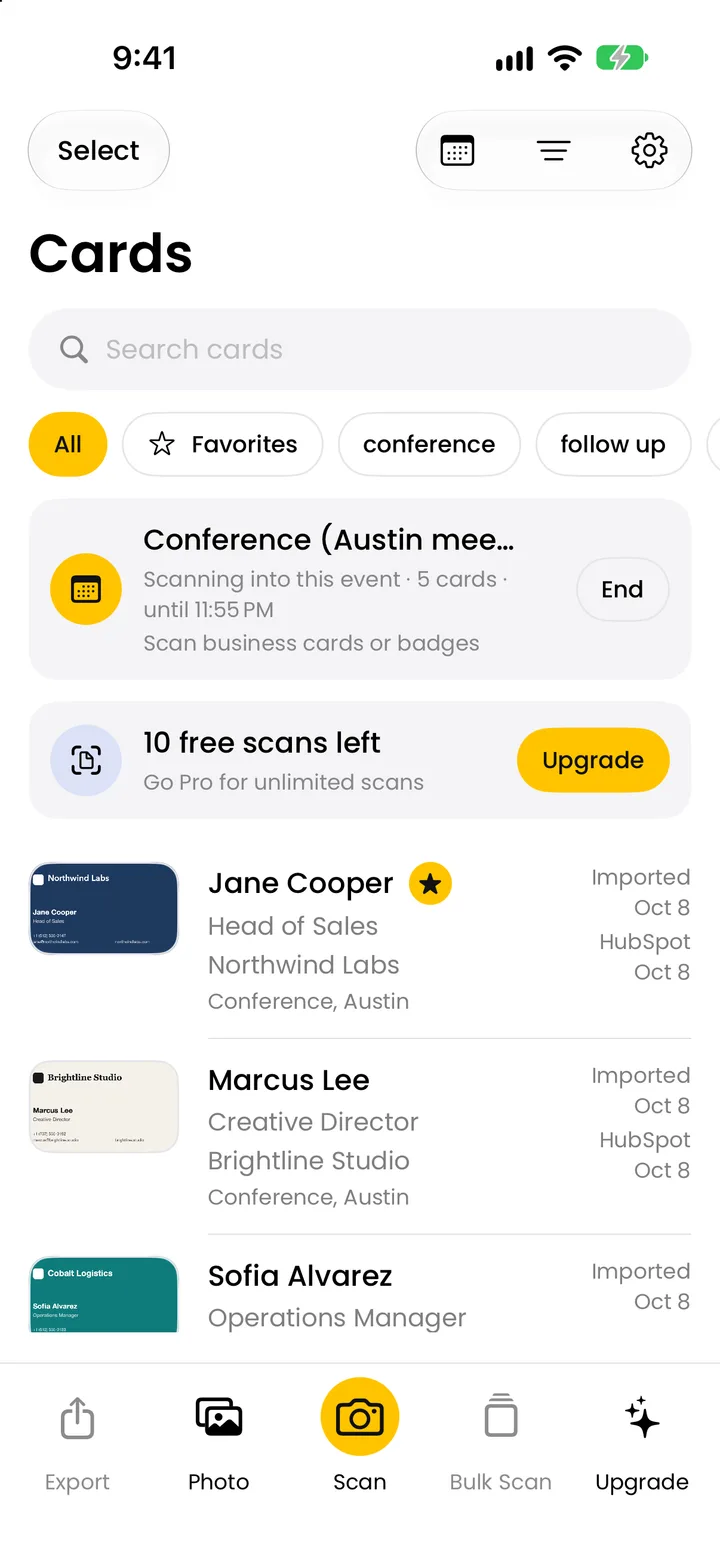
You hand these cards out at a show, and people hand you theirs. Krane is an app for iPhone, iPhone Duo and iPad. Its business card scanner reads each paper card with the camera, on your iPhone first, so it works with no signal, and files it under the event you’re at. With Krane Pro it sends cards to HubSpot, Salesforce or Pipedrive, or exports a CSV (see pricing). Krane is free for 10 scans a week.
A card with clear type, strong contrast and a vCard QR code is also an easy one for the next person’s scanner.
FAQ
Questions about the business card maker
Is this business card maker really free?
Yes. There’s no sign-up, no email, no watermark and no charge for the print PDF, the home-printing sheet or the PNGs. The limits apply only to the parts that use Krane’s server: 10 design requests a day and three photo reads a week. It is a free tool from Krane, an app for iPhone, iPhone Duo and iPad that scans business cards; you don’t need the app to use it.
Can I print the cards myself at home?
Yes. Download the sheet for home printing, on Letter or A4, and print it on perforated card stock at actual size (100%), never “fit to page”. US cards on Letter line up with Avery 5371 and 8371. For a two-sided card, print the second page on the back and flip on the long edge. A solid background may show a thin white edge.
What file should I send to a print shop?
Send the print PDF. It has one card per page, front then back, in CMYK, with 1/8 in bleed, crop marks and the text as outlines. Paste the spec line from under the downloads into your order. It gives the size, the bleed, one or two sides, the inks and a suggested stock. Agree the quantity and finish with the shop.
What size is the card?
You pick US, 3.5 × 2 in, which is also the Canadian size, or European, 85 × 55 mm. The Portrait layout turns either one upright. The PDF page is a little larger than the card, because it holds the bleed and crop marks around it. The business card dimensions guide lists other sizes.
Does it use AI?
Yes, for the three suggestions only. When you press Design it, an AI model picks three directions from the tool’s own 10 layouts, 8 type pairings, 12 color schemes and five backs, and writes a name and one reason for each. It draws nothing and writes no card text unless your brief asks for a tagline. You can skip it and pick everything by hand.
What do you do with my details?
Krane doesn’t keep them. The card is drawn in your browser. Design it sends your brief, name, job title, company and tagline to Krane’s server; phone numbers, email and address are not sent, and Krane doesn’t store or log what it gets. A photo of an old card is sent to be read and isn’t stored. The card you’re making stays in your browser.
Can I add my logo?
No. The maker takes no images, so there is no logo upload. The Monogram layout and back set your initials large, and the Wordmark layout and back set the company name as a mark. If the card needs your logo, a designer or a print shop has to rebuild the design with it. The PDF can’t be edited, because its text is outlines.
Can I add a QR code?
Yes, on the back. Choose the QR code back, and the code holds your name, job title, company, phones, email, website and address as a vCard, written into the code itself. A phone camera reads it and offers to save the contact. There is no link inside, so it never expires. The code is made in your browser and isn’t sent anywhere.
Why does it say my text doesn't fit?
The tool won’t set type too small to print: details stay at 6.5 pt or larger, and 7 pt for white type on a dark card. When a line won’t fit, the name gets smaller first, and long lines break over two. As a last resort the least important line, starting with the tagline, is left off. Each step is noted under the card. Shorten a line or try another layout.
Can I edit the PDF afterwards?
Not the text. It is saved as outlines, shapes rather than letters, so no program can retype it. Change the card on this page and download again. The card is kept in your browser’s storage on this device, so it is still there when you come back, unless you clear the browser’s data or used a private window.
You hand out the cards. Krane files the ones you get back.
Free for 10 scans a week. Krane Pro adds unlimited scans, export and CRM sync.
On a computer? Point your iPhone camera at the code, or text me the link.