Free tool
Business card reader, from photo to contact
Drop in a photo of a business card. Krane’s server reads the name, company, phones and email into a contact you can correct and download as a vCard or CSV. Three free reads a week.
Your photo is sent to Krane to be read. It isn't kept. No account.
Pressing the button sends this photo to Krane to be read. It isn't kept. 3 free reads a week.
The contact appears here: name, company, phones, email. You can correct it before you download it.
From photo to contact
You look at a paper business card and type what it says into your phone, one field at a time.
This business card reader does the typing from a photo. You check the result.
- Drop a photo of the card on the page, choose the file or paste it. On a phone, the file picker offers the camera.
- Press Read the card. The page sends the photo to Krane’s server, where it is read. A bot check runs first, and sometimes it asks you to tick a box.
- Check the fields. A form shows the name, company, job title, department, phones (each marked mobile, work, fax or other), emails, websites, address and social handles, in the script printed on the card. Correct anything that doesn’t match.
- Download the contact as a .vcf or a CSV. Or point your phone’s camera at the QR code under the form, and the phone offers to save the contact.
What is a .vcf? It’s one contact saved as a small file, in a format called vCard. iPhone, Android and Google Contacts all import it.
Where your photo goes
The other tools on this site work inside your browser. This one can’t. Your photo is sent to Krane’s server to be read.
Before it leaves, your browser shrinks the photo to at most 1,600 pixels on its long side and re-saves it as a JPEG. That drops the location and camera details stored in the original file. Krane reads the smaller copy and doesn’t store it. The contact comes back to the page, and Krane doesn’t store or log that either. It keeps one thing: a count of your reads, for a week.
The card holds someone else’s details, so send only cards you were given. The privacy policy covers the service providers Krane uses.
Three reads a week
Each read costs Krane money, and the tool is free. So there’s a limit of three reads a week per visitor. You don’t need an account or an email address.
What counts as a read? Every photo you send, including one with no card in it. Your reads come back a week after your first one.
The reader as a whole also has a monthly budget. If that runs out, the tool pauses until the next month.
A photo that reads well
- Get the whole card in the frame, filling most of the picture. Upright or sideways is fine.
- Lay the card flat on a plain, darker surface.
- Use even light. A glossy card reflects a lamp or a flash, and the glare hides the print.
- Hold the phone still until the text is sharp.
- For a two-sided card, photograph the side with the contact details. Type anything from the other side into the form.
- Look twice at small gray text on a dark card and at decorative script. They are the hardest to read.
Check each field against the card, because the reader can misread a digit.
What to do with the contact
| Where it goes | Use | How |
|---|---|---|
| iPhone or Mac | .vcf | Open the file and Contacts offers to add it |
| Android | .vcf | In the Contacts app, tap Organize or Fix & manage, then Import from file |
| Outlook for Windows | CSV | Outlook imports contacts from a CSV, not a .vcf |
| Excel or Google Sheets | CSV | One row with plain column names |
| The phone in your hand | QR code | Point the camera at the code and the phone offers to add the contact |
For a CRM, the VCF to CSV converter turns the .vcf into the columns HubSpot, Salesforce, Google Contacts or Outlook expect. For a QR code with your own details, use the business card QR code generator.
Krane for iPhone
With Krane: a stack of cards
This page reads one card at a time, three a week, from a photo you already took. After a trade show you have fifty.
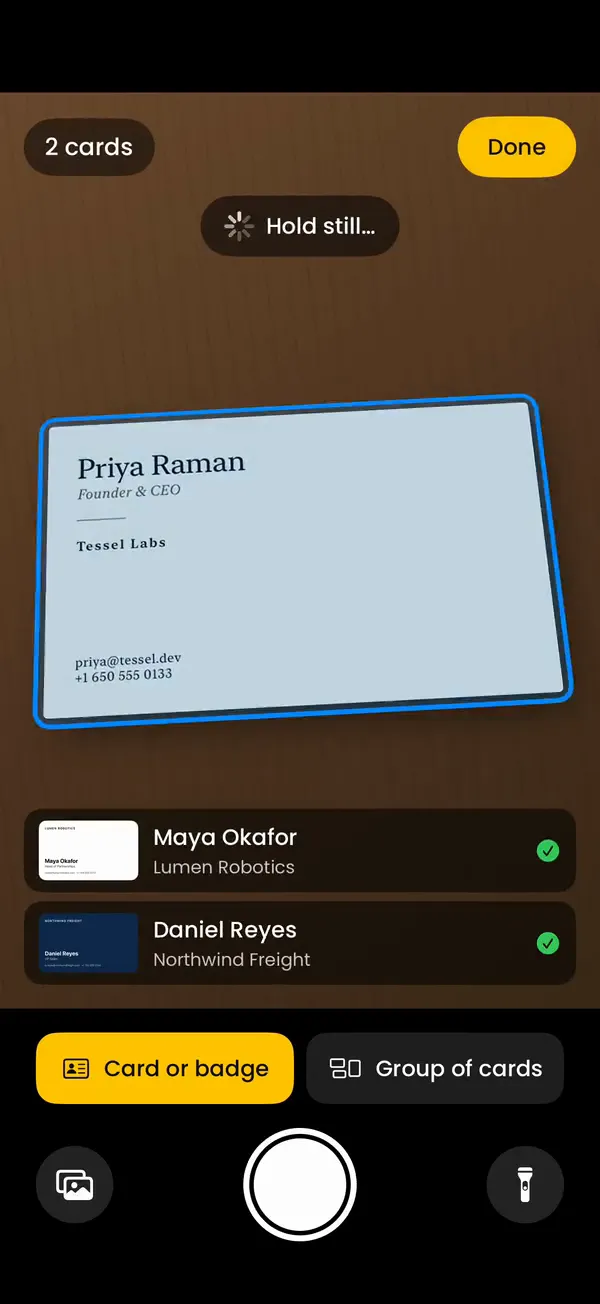
Krane is an app for iPhone, iPhone Duo and iPad. Its business card scanner reads each card with the camera as you’re handed it, with or without a signal, and files it under the event you’re at. It reads badges too. With Krane Pro it sends cards to HubSpot, Salesforce or Pipedrive, or exports a CSV. Krane is free for 10 scans a week.
There is no Android, Windows or web version of Krane. This page is the only part that works there.
FAQ
Questions about the business card reader
Is this business card reader free?
Yes. You get three reads a week with no account and no email address. Each read costs Krane money, which is why there is a limit. Correcting the fields and downloading the .vcf or CSV happen in your browser and don’t use a read.
Is my photo uploaded?
Yes. The photo is sent to Krane’s server to be read. Before it leaves, your browser shrinks it to at most 1,600 pixels on its long side and re-saves it as a JPEG, which drops the location and camera details in the original file. Krane doesn’t store the photo or the contact it reads. The other tools on this site work in your browser and upload nothing.
Why only three cards a week?
Each read costs Krane money and the tool is free, so each visitor gets three reads a week. A photo with no card in it still uses one. Reads come back a week after your first. For a stack of cards, the Krane app on iPhone, iPhone Duo and iPad is free for 10 scans a week, and Krane Pro removes the limit.
Can it read cards in other languages?
Yes. The reader keeps the text in the script printed on the card and doesn’t translate it. A name that isn’t in Latin letters also gets a Latin spelling beside it, so you can still find the contact by typing on an English keyboard.
Can it read both sides of a card, or several cards in one photo?
No. Each photo is one side of one card. Photograph the side with the contact details and type anything from the back into the form. The Krane app adds the back of a card to the same contact on its free plan, and with Krane Pro it reads a group of cards from one photo.
Does it work on Android and Windows?
Yes. The reader works in any current browser: on an Android phone, a Windows laptop, a Mac or an iPhone. The Krane app is a separate thing. It runs on iPhone, iPhone Duo and iPad only, and has no Android or Windows version.
How do I save the contact to my phone?
Point the phone’s camera at the QR code under the form. iPhone and Android cameras read it as a contact and offer to add it. Or download the .vcf and open it on the phone. An iPhone opens it in Contacts, and on Android the Contacts app imports it through Organize, then Import from file.
The reader got a field wrong. What now?
Correct it in the form before you download; every field can be edited. If several fields came back wrong, look at the photo. A sharper, flatter photo with no glare reads better. A new photo uses another of your three reads, so fix a single wrong digit by hand.
One card here. A whole show's worth in Krane.
Free for 10 scans a week. Krane Pro adds unlimited scans, export and CRM sync.
On a computer? Point your iPhone camera at the code, or text me the link.